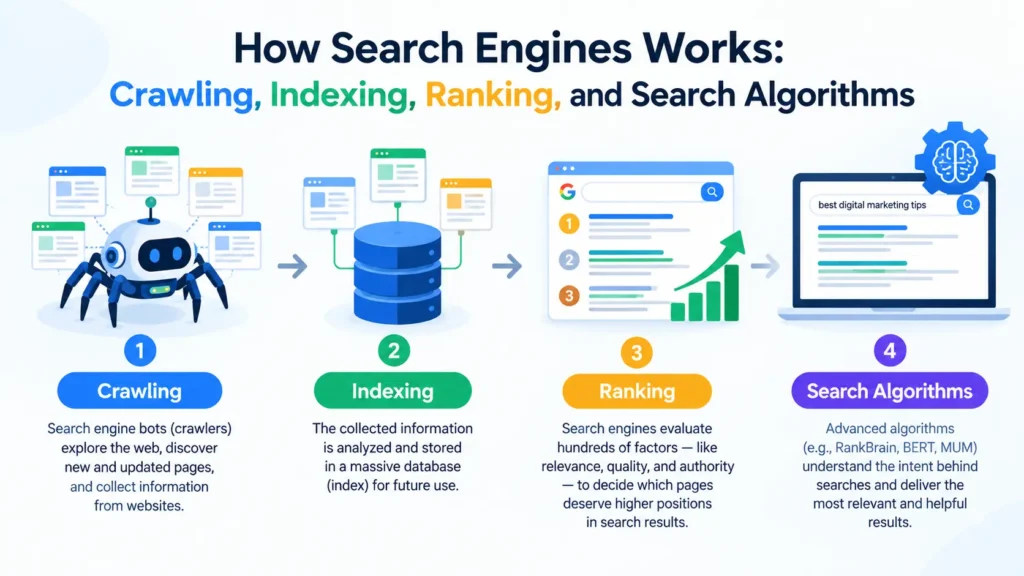
How Search Engines Work: A Complete Guide to Crawling, Indexing, Ranking, and Search Algorithms
Billions of searches happen every day, and most return an answer in a fraction of a second. It feels effortless, but behind that search box sits a huge piece of engineering. If you publish anything online, understanding how search engines work is the difference between guessing at SEO and making decisions with confidence.
This guide explains how search engines work from the ground up. You’ll see how they find your pages, how they decide what a page is about, and how they choose which result goes first. I built the structure around Google’s own documentation on the topic, then added the practical layer that documentation leaves out: what each stage means for your website and how to diagnose problems when something breaks.
Whether you run a personal blog, an online store, or a company website, knowing how search engines work gives you a map. Without one, every ranking drop feels like a mystery. With one, you can usually trace the cause to a specific stage.
What Is a Search Engine, Really?
A search engine is software that collects information from across the web, organizes it, and returns the most useful matches when someone asks a question. Google dominates the market, but Bing, DuckDuckGo, Yandex, Baidu, and others follow the same basic recipe. The details differ, yet the core idea of how search engines work is shared: find content, understand it, store it, and retrieve it quickly.
There is no central registry of every web page. Nobody maintains a master list, so search engines have to build their own, and they have to keep rebuilding it because pages are created, edited, moved, and deleted constantly.
Search Engine Architecture: The Three Stages
Google describes its system in three stages, and the same model helps explain how search engines work in general:
- Crawling: automated programs download text, images, and videos from pages they have found.
- Indexing: the engine analyzes that content and stores what it learns in a very large database.
- Serving results: when someone searches, the engine looks through the index and returns the results it judges most relevant and highest in quality.
Not every page makes it through all three stages. A page can be discovered but never crawled. It can be crawled but never indexed. It can be indexed and still rarely appear in results. Seeing the whole system as a pipeline with several checkpoints is the single most useful mental model for how search engines work.
Behind these stages sit supporting systems: schedulers that decide what to crawl and when, rendering systems that run JavaScript, canonicalization systems that group duplicates, spam-detection systems, and many ranking systems that work together at query time.
Two points from Google’s documentation are worth stating plainly. First, Google doesn’t accept payment to crawl a site more often or to rank it higher. Second, Google doesn’t guarantee that it will crawl, index, or serve any particular page, even when the page follows its guidelines. Treat anyone who promises otherwise with suspicion.
How Search Engines Work in Stage One: Crawling and URL Discovery
The first job is finding out what exists. Google calls this process URL discovery, and it happens in three main ways.
Known pages. The engine has already visited a page before and returns to check for changes.
Links. When a crawler fetches a known page, it extracts the links on it. A category page that links to a new blog post is a classic example. This link-following behavior is why the web is called a web, and it’s also why internal linking matters so much for your own site.
Sitemaps. You can hand the engine a list of URLs directly, which we’ll cover below.
Crawlers, Bots, and Spiders
The program that does the fetching is called a crawler, bot, robot, or spider. Google’s is Googlebot, Microsoft’s is Bingbot, and each major engine has its own. When people ask how search engines work at the technical level, this is usually the part they mean: a huge fleet of computers fetching billions of pages.
Googlebot uses an algorithmic process to decide which sites to crawl, how often, and how many pages to fetch from each. Crawlers are also built to be polite. They try not to fetch pages so fast that they overload your server, and they read the way your server responds. A burst of server errors is a signal to slow down.
Rendering: Seeing the Page Like a Browser
Modern websites often build their content with JavaScript. During crawling, Google renders the page using a recent version of Chrome and runs the JavaScript it finds. Rendering matters because content that only appears after a script runs would otherwise be invisible. If your key content depends on heavy client-side code that fails or loads too slowly, the engine may see an empty shell. This is one reason technical SEO and web development can’t be separated when you think about how search engines work in practice.
Why Some Discovered Pages Are Never Crawled
Finding a URL doesn’t mean visiting it. Common reasons a page goes uncrawled include:
- The site owner blocked it with a robots.txt rule.
- The page requires a login.
- The server returned errors or timed out.
- Network or DNS problems prevented access.
- The engine decided the page wasn’t worth the crawl effort compared with other URLs.
That last point leads to the idea of crawl budget: a site only gets so much crawler attention. For small sites it rarely matters. For large sites with thousands of low-value or near-duplicate URLs (filters, session parameters, endless calendar pages), wasted crawling can delay the discovery of your important pages.
XML Sitemaps and Internal Links: Your Two Discovery Tools
If crawling is about discovery, you have two main ways to help.
XML Sitemaps
An XML sitemap is a file that lists the URLs you want a search engine to know about. Think of it as handing the crawler a guest list instead of hoping it finds every door. Sitemaps are especially useful for new sites with few inbound links, large sites, sites with deep or poorly connected pages, and sites that publish news or video.
A few practical rules:
- Include only canonical, indexable URLs that return a 200 status code. Don’t list redirected, blocked, or noindexed pages.
- Keep lastmod honest. An accurate last-modified date can help engines prioritize recrawling. Inflating it on every page teaches them to ignore it.
- Respect size limits. A single sitemap can hold up to 50,000 URLs or 50 MB uncompressed. Larger sites use a sitemap index file to group several sitemaps.
- Submit it in Google Search Console and Bing Webmaster Tools, and reference it in your robots.txt file.
A sitemap is a suggestion, not a command. Submitting a URL doesn’t guarantee it will be crawled, indexed, or ranked. That is one more reminder of how search engines work: they make their own decisions based on their own priorities.
Internal Links
Internal links are often more powerful than sitemaps, because they do two jobs at once. They help crawlers find pages, and they tell the engine which pages matter most on your site. A page linked from your homepage and main navigation signals importance. A page buried five clicks deep, or with no links pointing to it at all (an “orphan page”), signals the opposite.
To use internal links well:
- Use real <a href> links. Crawlers follow standard links reliably, while buttons and click handlers that rely on JavaScript may not be followed.
- Write descriptive anchor text such as “crawl budget basics” instead of “click here.” The text gives context about the destination.
- Link new posts from relevant older posts and from hub pages.
- Keep important pages within a few clicks of your homepage.
If you remember one thing about how search engines work at the discovery stage, make it this: a crawler can only follow paths that exist, so build clear ones.
Robots.txt: Crawling Control, Not Indexing Control
The robots.txt file tells crawlers which parts of your site they may fetch. It’s a crawling instruction, not an indexing instruction, and people confuse the two constantly. If you block a page in robots.txt, the crawler can’t read it, which also means it can’t see a noindex tag on that page. A blocked URL can even appear in results without a description if other sites link to it. To keep a page out of search results, allow crawling and use a noindex directive, or protect the page with authentication.
How Search Engines Work in Stage Two: Indexing
After a page is crawled, the engine tries to understand it. This is indexing, and it involves processing the text and key tags and attributes, including title elements, headings, alt attributes, images, and videos.
Canonicalization: Choosing the Representative Page
The web is full of duplicates: the same product at several URLs, http and https versions, tracking parameters, printer-friendly copies, syndicated articles. During indexing, Google groups pages with similar content into a cluster and selects the one most representative of the group as the canonical. That canonical is the page that may be shown in results. The others are alternates that may be served in particular contexts, such as a mobile search or a very specific query.
You can influence this choice with rel=”canonical” tags, redirects, consistent internal linking, and sitemap listings. But the engine treats these as hints. If your signals conflict, it may choose a different canonical from the one you wanted.
Signals Collected During Indexing
While processing the canonical page, the engine also gathers signals that feed into ranking later. These include the language of the page, the country the content is relevant to, and how usable the page is. The result is stored in the index, a huge database spread across thousands of machines.
Why Pages Get Excluded From the Index
Indexing isn’t guaranteed. Not every processed page is stored. Typical reasons include:
- Low-quality or thin content. Pages that add little beyond what already exists online are the most common casualty.
- Duplicate content. If another URL is chosen as the canonical, yours is left out.
- Noindex directives. A robots meta tag or X-Robots-Tag header explicitly asks the engine not to index the page.
- Soft 404s. The page says “not found” or is nearly empty but returns a 200 status code, so the engine treats it as an error.
- Redirects. A redirected URL hands its place to the destination.
- Rendering problems. Important content that fails to load for the crawler can’t be indexed.
- Technical design. Some site structures make indexing difficult, especially heavy JavaScript implementations.
Many site owners are surprised by this stage. They assume that if a page exists and is crawlable, it will be indexed. In reality, indexing is selective, and the more a site publishes low-value pages, the more the engine may hold back on the rest. Understanding this is central to how search engines work and to why quality matters before ranking even begins.
Mobile-First Indexing
Google predominantly uses the mobile version of a page for indexing and ranking. If your mobile version hides content, drops structured data, or blocks resources that your desktop version includes, the engine may never see them. Keep the mobile and desktop versions equivalent in content and metadata.
How Search Engines Work in Stage Three: Serving and Ranking Results
When a user types a query, the engine searches its index for matching pages and returns those it believes are the highest quality and most relevant. Relevance is determined by hundreds of factors, and Google’s documentation gives familiar examples: the user’s location, language, and device.
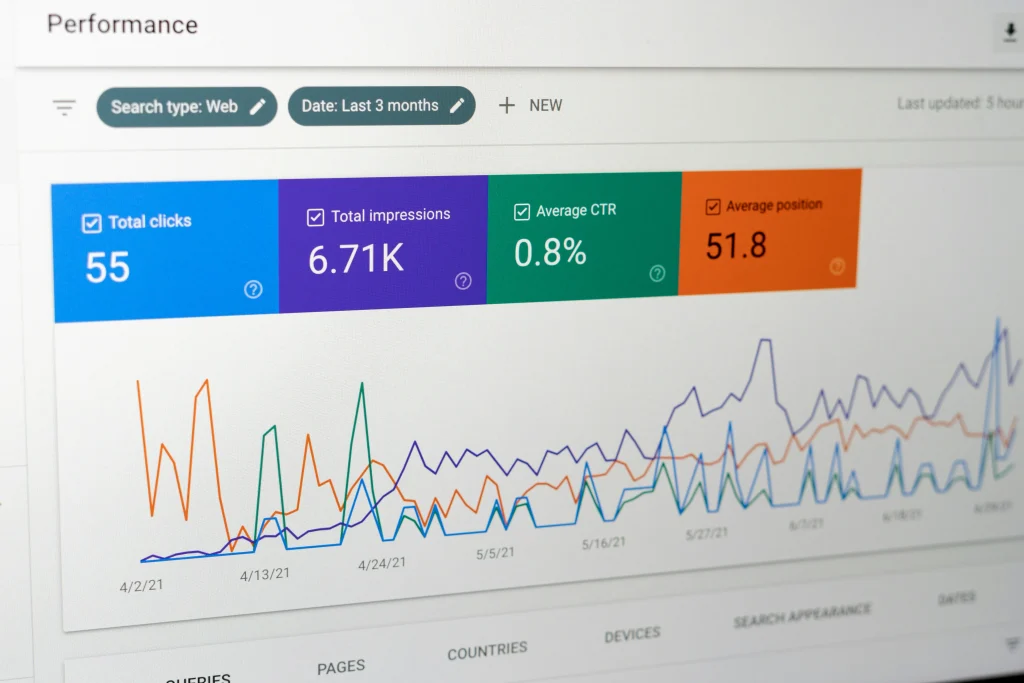
The same query can produce different results for different people. Searching for “bicycle repair shops” in Paris returns different results than the same search in Hong Kong. The search features on the page change too. That query will likely show local results and a map, while “modern bicycle” is more likely to show images. So there is no single, universal ranking for any keyword. This is a major reason rank-tracking tools show averages, and why you should treat any single ranking screenshot with caution.
Search Intent and Contextual Understanding
Modern ranking isn’t just matching words. Engines try to understand what the person actually wants. Search intent usually falls into four broad groups:
- Informational: the person wants to learn something (“how search engines work”).
- Navigational: the person wants a specific site or page (“Google Search Console login”).
- Commercial investigation: the person is comparing options (“best SEO tools”).
- Transactional: the person is ready to act (“buy running shoes online”).
A page can be well written and technically perfect and still fail because it serves the wrong intent. If the top results for a query are all step-by-step guides and you publish a sales page, you’re swimming against the current. Before writing, search your target phrase and study what kinds of pages already rank. That tells you more about intent than any keyword tool.
Engines also use contextual understanding to interpret ambiguous or conversational queries. They look at the surrounding words, handle synonyms, correct spelling mistakes, and recognize entities such as people, places, and brands. A search for “jaguar speed” could mean the animal or the car, and the engine uses context to decide. Language-understanding models, which Google has described in connection with systems such as RankBrain, neural matching, and BERT, help connect the meaning of a query to the meaning of a page even when the exact words differ. This is why stuffing a page with repeated keywords no longer works as it once did. When you consider how search engines work today, meaning matters more than string matching.
Core Concepts Behind Google’s Ranking Systems
Google doesn’t use a single algorithm. It runs many ranking systems, each with a different job, and combines their outputs. Google publishes a guide to these systems, and the following concepts capture the main ideas.
Relevance. Does the page address the topic and the intent of the query? Relevance includes the words on the page, but also headings, titles, links pointing to it, and the overall subject coverage.
Quality and helpfulness. Google’s systems aim to reward content created to help people, rather than content created mainly to attract search traffic. Signals associated with experience, expertise, authoritativeness, and trustworthiness, usually shortened to E-E-A-T, guide how quality is evaluated. They are a framework for assessing content, not a single score you can measure.
Links and authority. Links from other sites remain a signal that a page is valued. Early link analysis such as PageRank was an important part of how search engines work from the beginning, and links are still one input, though no longer the only one and far more nuanced than simple counting.
Page experience. Loading speed, visual stability, responsiveness, mobile friendliness, and the absence of intrusive interstitials contribute to a better experience. Google describes these as factors that matter, but great page experience doesn’t override poor relevance.
Freshness. For some searches, such as news, events, and trending topics, recent content is favored. For others, a timeless guide may serve best.
Location and personalization. Local intent, language, and device shape which results appear.
Spam protection. Systems designed to detect manipulation, such as link spam, scraped content, and cloaking, work continuously. Spam updates adjust these systems.
Core Updates
Google changes its systems regularly. Several times a year it releases broad “core updates” that adjust how its ranking systems assess content. A ranking drop after a core update doesn’t automatically mean a penalty. It often means other pages are now judged to be more helpful for those searches.
These updates have been frequent recently. Google released the May 2026 core update as its second core update of 2026, after the March 2026 core update, the March 2026 spam update, and the February 2026 Discover update. Search Engine Land’s report on the completed rollout notes that the update caused a lot of ranking volatility, and Google shared no new guidance specific to it. Search Engine Journal also reported that Google’s only official description at launch was a Search Status Dashboard entry, with no companion blog post and no stated goals. For site owners, the lesson is consistent: Google keeps pointing back to people-first, helpful, reliable content, and it advises waiting until a rollout finishes before judging the impact in your Search Console data.
For the full reports, see Search Engine Land’s coverage of the May 2026 core update rollout completing and Search Engine Journal’s report on the May 2026 core update rolling out. They are good examples of how search engines work as a moving target rather than a fixed formula.
The Search Results Page Itself
The list of blue links is only part of the picture. Depending on the query, results can include featured snippets, local packs, image and video results, top stories, AI-generated summaries, and more. Optimizing for these features starts with the same foundation: content that can be crawled, indexed, and understood. Structured data can help engines interpret specific content types such as products, recipes, events, and articles, which can make a page eligible for enhanced displays. Structured data doesn’t directly improve rankings, but it removes ambiguity about what a page contains.
Why Indexed Pages May Still Not Appear in Results
A common frustration: Search Console reports that a page is indexed, yet it’s nowhere to be found for the query you expected. Google’s documentation lists the usual causes: the content is irrelevant to the queries people use, the quality is low, or robots meta rules prevent serving.
In practice, add a few more suspects. The page may face stronger competition than you think. It may target an intent that doesn’t match the page type. It may lack internal links and external references that signal importance. Or it may simply be new, and engines often need time to gather signals before they place a page confidently. Remember that “indexed” means the page is eligible, not that it deserves a particular position. That distinction sits at the heart of how search engines work.
How to Diagnose Crawling and Indexing Problems
Now the practical part. When a page isn’t performing, work through the pipeline in order: discovery, crawling, rendering, indexing, then ranking. Fixing a ranking problem is pointless if the page was never indexed.
Step 1: Check Whether the Page Is Indexed
Open Google Search Console and use the URL Inspection tool. It shows whether a URL is in the index, when it was last crawled, which canonical Google selected, and whether the page can be indexed. You can also try the site: search operator for a rough check, though Search Console is more reliable.
Step 2: Read the Page Indexing Report
The Page Indexing report groups your URLs by status and gives reasons for exclusion. The most common statuses include:
- Discovered – currently not indexed: Google knows the URL but hasn’t crawled it yet. This often points to crawl prioritization, a weak site structure, or a server that can’t handle more requests.
- Crawled – currently not indexed: Google fetched the page and decided not to index it, which usually signals a content quality, duplication, or value problem.
- Duplicate without user-selected canonical / Alternate page with proper canonical tag: Google chose another URL as the main version.
- Excluded by ‘noindex’ tag: the page told Google to stay out. Check that this is intentional.
- Blocked by robots.txt: a crawling rule is in the way.
- Soft 404: the page looks empty or error-like to Google.
- Page with redirect: the URL forwards elsewhere.
- Server error (5xx) and Not found (404): technical failures that need fixing or deliberate handling.
Step 3: Test Crawl Access
Review your robots.txt file, either in your browser at /robots.txt or through the robots testing tools in Search Console. Confirm you aren’t blocking CSS, JavaScript, or entire directories by accident. Then check the Crawl Stats report to see how often Googlebot visits, what status codes it receives, and how fast your server responds. Rising server errors or slow response times can cause crawlers to back off.
Step 4: Check Rendering
In the URL Inspection tool, view the rendered HTML and screenshot of the page as Google sees it. If key text, links, or images are missing, you have a rendering problem. Common causes include scripts blocked by robots.txt, content loaded only after user interaction, and lazy-loading implemented in a way crawlers can’t trigger. Where possible, serve critical content in the initial HTML or use server-side rendering.
Step 5: Audit Internal Links and Sitemaps
Crawl your own site with a tool such as Screaming Frog or Sitebulb to find orphan pages, broken links, long redirect chains, and pages buried too deep. Compare your sitemap against your live site: every sitemap URL should be canonical, indexable, and return a 200 status. Remove everything else.
Step 6: Evaluate Content and Intent
If the technical checks pass and the page is still excluded or underperforming, the issue is probably the content. Ask honest questions. Does this page offer something distinct from what already ranks? Does it show first-hand experience or genuine expertise? Does it match what searchers want from this query? Is it so similar to other pages on my own site that it’s competing with them? Improving, consolidating, or removing weak pages often does more than publishing new ones.
Step 7: Request Reindexing, Then Be Patient
After fixing an issue, use URL Inspection to request indexing for important pages. This is a nudge, not a guarantee, and it won’t speed up a page the engine considers low value. Monitor the Page Indexing report over the following days and weeks. Search engines work on their own schedules, so patience is part of the job.
A Quick Troubleshooting Checklist
| Symptom | Likely stage | First thing to check |
| New page isn’t discovered | Discovery | Internal links, sitemap inclusion |
| “Discovered – currently not indexed” | Crawling | Site structure, server health, crawl demand |
| “Crawled – currently not indexed” | Indexing | Content quality, duplication |
| Wrong URL shows in results | Canonicalization | Canonical tags, redirects, internal links |
| Indexed but no visibility | Ranking | Search intent match, competition, authority |
| Sudden sitewide drop | Ranking or technical | Core update timing, server errors, accidental noindex |
Practical Ways to Work With How Search Engines Work
Knowing the mechanics is only useful if it changes what you do. These habits follow directly from everything above.
Make every important page reachable. Link to it from relevant pages and include it in your sitemap. Reachability is the foundation of how search engines work at the discovery stage.
Keep your technical house clean. Fix server errors, remove redirect chains, use HTTPS, and keep your site fast and mobile-friendly. Crawlers treat a healthy site as one worth visiting often.
Publish fewer, stronger pages. Because indexing is selective, a focused site usually outperforms a bloated one. Consolidate overlapping articles and prune pages that no one needs.
Write for the person, then check the engine. Start with the reader’s question and the intent behind it. Then verify that titles, headings, and structured data make the page easy to interpret.
Build real authority. Earn mentions and links by creating things worth referencing: original research, useful tools, clear explanations. Authority is how search engines work out which sources to trust.
Monitor regularly. Check Search Console weekly. Catching an accidental noindex tag or a spike in server errors within days saves months of lost traffic.
Stay informed, but avoid panic. Follow the Google Search Central blog and reputable industry news. When an update rolls out, wait for it to finish, compare against a baseline, and resist the urge to rewrite everything overnight.
Common Myths About How Search Engines Work
“Submitting my sitemap guarantees indexing.” It doesn’t. It helps discovery only.
“Robots.txt keeps pages out of Google.” It blocks crawling, not indexing. Use noindex or authentication to keep pages out of results.
“More pages mean more traffic.” Low-value pages can dilute your site and waste crawl attention.
“Keyword density is a ranking factor.” There is no magic percentage. Engines understand topics and meaning, so write naturally and cover the subject thoroughly.
“Paying for ads improves organic rankings.” Google states that ranking is done programmatically and that payment doesn’t buy higher organic rankings.
“A ranking drop means I’ve been penalized.” Most drops come from relative changes in how other pages are judged, not from a manual action. Check Search Console for manual action notices before assuming the worst.
Frequently Asked Questions
How do search engines work in simple terms?
They send out automated crawlers to find web pages, analyze and store what they find in a giant index, and then, when you search, retrieve and rank the pages that best match your query and intent.
How often do search engines crawl a website?
It varies widely. Popular, frequently updated sites may be crawled many times a day, while small, static sites may be visited far less often. Crawl frequency depends on the site’s perceived importance, update patterns, and server health.
Why is my page crawled but not indexed?
Usually because the engine judged it low in value, a near-duplicate of another page, or otherwise not worth storing. Improve uniqueness and usefulness, strengthen internal links, and check the canonical settings.
How long does it take for a new page to appear in search results?
It can take anywhere from a few hours to several weeks. Strong internal links, a sitemap, and a well-established site tend to speed things up, but nothing is guaranteed.
Do all search engines work the same way?
They share the same fundamentals of crawling, indexing, and ranking, but each has its own crawler, index, and ranking systems. Some, such as Bing, also support protocols like IndexNow that let sites notify the engine about changes instantly.
What is the difference between crawling and indexing?
Crawling is fetching a page. Indexing is analyzing it and deciding whether to store it. A page can be crawled and never indexed.
Final Thoughts
If you take one idea from this guide, let it be that search is a pipeline, not a single switch. Pages are discovered, crawled, rendered, indexed, and finally ranked, and each stage has its own failure points. Once you see how search engines work this way, troubleshooting becomes methodical instead of emotional: you identify the stage where your page stalls, fix the cause, and move on.
Google’s documentation remains the best primary source for the fundamentals, and it’s worth rereading as the systems evolve. The mechanics of crawling and indexing change slowly, while ranking systems change often. Build on the stable foundation of accessible, well-structured, genuinely helpful content, and you’ll be in good shape no matter which update arrives next.
The better you understand how search engines work, the less you’ll need to chase tricks, and the more your effort will go where it matters: serving the people who are searching.
Pingback: Keyword Research for SEO: Find the Right Keywords (2026)