
Technical SEO Explained: The Complete Website Optimization Checklist
I have spent ten years auditing websites, fixing indexing problems, and rescuing traffic after migrations that went wrong. The most common thing I see is a business that spends heavily on content and links while its foundation quietly leaks. Pages aren’t indexed, redirects loop, and canonical tags point to the wrong URLs. That is why every credible SEO service I have run or recommended starts with the technical layer.
This guide covers the technical requirements that help search engines access, understand, and index your website. Whether you manage a site yourself or are evaluating a technical SEO service provider, use it as a working checklist.
Technical SEO is the practice of optimizing your website’s infrastructure so search engines can crawl, render, index, and rank your pages without obstacles. It has nothing to do with keywords or copywriting. It is about the plumbing: server responses, URL structures, site architecture, rendering, and the signals you send to search engines.
Think of it as three questions search engines ask about every page:
- Can I access it? (crawlability)
- Can I understand it? (rendering, structured data, canonicalization)
- Should I keep it in my index? (quality, duplication, security, performance)
If the answer to any of these is no, great content will not save you. In my experience, a professional SEO service that skips the technical audit is guessing. Technical fixes often produce the fastest wins because they remove barriers instead of building something new.
A good technical SEO service typically covers crawl analysis, index coverage review, site speed and Core Web Vitals, structured data, international setup, and migration support. The rest of this article walks through the essentials in the order I usually audit them.
HTTPS and Website Security: The Non-Negotiable Baseline
HTTPS encrypts the connection between a visitor’s browser and your server. Google confirmed HTTPS as a lightweight ranking signal years ago, but the bigger reasons to use it are trust and functionality. Browsers flag HTTP pages as “Not secure,” which damages conversions, and many modern browser features only work on secure origins.
How to implement HTTPS correctly
Installing an SSL/TLS certificate is only the first step. I regularly find sites with a certificate where the migration was left half-finished. Check the following:
- Redirect all HTTP URLs to HTTPS with a single 301 redirect. Avoid chains like http → https → www → trailing slash.
- Update internal links so they point directly to HTTPS URLs rather than relying on redirects.
- Fix mixed content. If an HTTPS page loads images, scripts, or stylesheets over HTTP, browsers may block them and display warnings.
- Update canonical tags, hreflang annotations, and sitemap URLs to the HTTPS versions.
- Renew certificates on time. An expired certificate triggers a full-page browser warning and can wipe out traffic overnight.
- Enable HSTS (HTTP Strict Transport Security) once you are confident everything works, so browsers always use HTTPS.
Security beyond HTTPS
Security is also an SEO issue. A hacked site can be injected with spam pages, cloaked content, or malicious redirects, and search engines may display warnings or remove affected pages. Keep your CMS, themes, and plugins updated, use strong authentication, run regular malware scans, and monitor Google Search Console’s Security Issues report.
When I take on a new client for a SEO service engagement, the first thing I check is whether the site resolves to exactly one secure version. Most sites are reachable at four variants (http/https, www/non-www), and only one should return a 200 status code.
XML Sitemaps and Robots.txt: Guiding Search Engine Crawlers
These two files are small, but they shape how search engines move through your site.
XML sitemaps
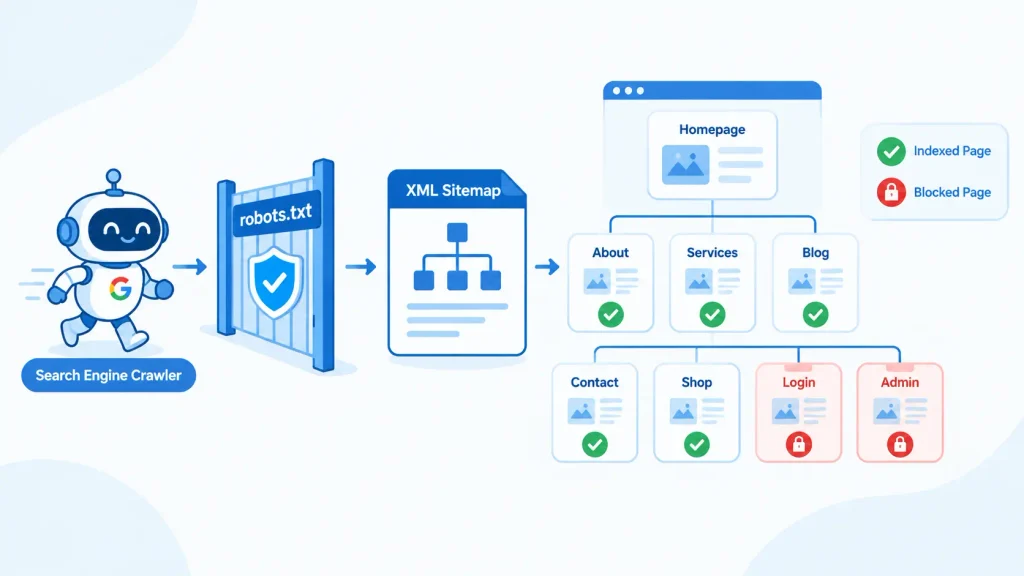
An XML sitemap is a list of URLs you want search engines to discover and index. It does not guarantee indexing, but it helps crawlers find pages, especially on large sites, new sites, or sites with weak internal linking.
Sitemap best practices:
- Include only canonical, indexable URLs that return a 200 status code. Leave out redirected, noindexed, blocked, or error pages.
- Stay within the limits: 50,000 URLs or 50 MB uncompressed per sitemap file. Use a sitemap index file to organize multiple sitemaps.
- Keep the <lastmod> date accurate. Only update it when the content meaningfully changes. Search engines learn to ignore dishonest timestamps.
- Reference your sitemap in robots.txt and submit it in Google Search Console and Bing Webmaster Tools.
- Split large sites into logical sitemaps (products, blog posts, categories). This makes index coverage problems far easier to diagnose.
Robots.txt
The robots.txt file sits at the root of your domain and tells crawlers which paths they may or may not request. It is a crawl-control tool, not an index-control tool. That distinction causes more mistakes than almost anything else I see.
Key rules to remember:
- Blocking a URL in robots.txt does not remove it from search results. If other sites link to it, the bare URL can still appear without a description.
- Do not combine a robots.txt block with a noindex tag. If crawlers cannot fetch the page, they never see the noindex directive. To deindex a page, allow crawling and use noindex.
- Never block CSS or JavaScript files that are needed to render the page. Google needs them to understand your layout and content.
- Test before deploying. One misplaced Disallow: / has taken entire sites out of search. I have seen it happen after a staging-to-production push.
A simple, healthy robots.txt looks like this:
User-agent: *
Disallow: /cart/
Disallow: /internal-search/
Sitemap: https://www.example.com/sitemap_index.xml
Canonical Tags: Telling Search Engines Which URL Matters
The same content is often reachable at multiple URLs: with and without tracking parameters, with different sort orders, with and without trailing slashes, or through filtered category pages. Search engines have to pick one version to show, and if you do not tell them which, they may choose differently than you would.
The canonical tag (rel=”canonical”) is how you state your preference:
<link rel=”canonical” href=”https://www.example.com/blue-widgets/” />
Canonical tag best practices
- Use absolute URLs, not relative ones, to avoid misinterpretation.
- Add self-referencing canonicals to every indexable page. It is a simple safeguard against parameter variations and scraped copies.
- Point to a single, indexable, 200-status URL. A canonical pointing to a redirect, a 404, or a noindexed page sends contradictory signals.
- Keep one canonical per page. Multiple conflicting tags cause search engines to ignore them.
- Place the tag in the <head>. Canonicals injected late or placed in the body may be ignored.
- Remember it is a hint, not a directive. Google can override your canonical if other signals (internal links, redirects, sitemaps) disagree. Make sure those signals all point to the same URL.
Common canonical mistakes
The most damaging one I see is a site-wide canonical pointing at the homepage, usually from a template or plugin misconfiguration. Search engines may then treat every page as a duplicate of the homepage. Another frequent error is paginated pages canonicalized to page one, which hides deeper content from discovery. Any serious technical SEO service will audit canonical logic across templates, not just individual pages.
Redirects and Broken Links: Protecting Link Equity and User Experience
Pages move, products sell out, and content gets consolidated. How you handle these changes decides whether you keep your rankings or lose them.
Choosing the right redirect
- 301 (permanent): The standard for moved content. It passes ranking signals to the new URL and tells search engines to replace the old URL in the index.
- 302 / 307 (temporary): Use only when the move really is temporary, such as a short-term promotion page.
- Meta refresh and JavaScript redirects: Avoid these when a server-side redirect is possible. They are slower and less reliable for crawlers.
Redirect problems to eliminate
- Redirect chains. URL A → B → C wastes crawl resources and dilutes performance. Redirect A straight to C.
- Redirect loops. A → B → A makes the page inaccessible and returns an error.
- Redirecting everything to the homepage. When you remove a page, redirect it to the most relevant alternative. Blanket homepage redirects are often treated as soft 404s.
- Leaving internal links pointing at redirected URLs. Update the links to point to the final destination.
Broken links and 404 errors
A 404 is not automatically a problem. If a page is gone and has no replacement, a 404 or 410 is the correct response. The problem arises when you have broken internal links pointing to those URLs, or when valuable pages with backlinks return errors.
My routine is:
- Crawl the site and export all 4xx and 5xx URLs.
- Cross-reference them against backlink data and Search Console to find pages that still earn traffic or links.
- Redirect those to the closest relevant page.
- Fix internal links pointing at dead URLs.
- Make sure a real 404 status is returned, not a “soft 404” that shows an error message with a 200 code.
Redirect mapping is the area where a professional SEO service often earns its fee, especially during migrations. A single poorly mapped redesign can erase years of accumulated authority.
Duplicate Content: Finding and Fixing the Hidden Problem
Duplicate content means substantial blocks of identical or very similar content appearing at more than one URL. It is rarely a “penalty” in the way people fear, but it does cause real problems: diluted link signals, wasted crawl effort, and search engines choosing the wrong version to rank.
Where duplicate content comes from
- URL parameters (tracking codes, session IDs, sorting and filtering)
- HTTP/HTTPS and www/non-www versions both being accessible
- Trailing slash and capitalization variations
- Printer-friendly or AMP versions
- Tag, category, and archive pages in a CMS repeating the same excerpts
- Manufacturer descriptions copied across ecommerce product pages
- Syndicated or scraped content
- Near-identical location pages with only the city name swapped
How to resolve it
| Situation | Best fix |
| Same page at multiple URLs | 301 redirect to the preferred version |
| Parameter or filter variations that must stay accessible | Self-referencing or consolidated canonical tags |
| Thin tag/archive pages | Noindex, or consolidate |
| Near-duplicate product variants | Canonicalize to the main product, or differentiate content |
| Syndicated content | Ask the partner to use a cross-domain canonical to your original |
The long-term solution is to make unique content a priority. Rewrite templated descriptions, merge overlapping articles, and give every indexable page a distinct purpose. When clients ask me what a good SEO service should do about duplication, my answer is always the same: consolidate first, differentiate second, and use canonicals as the safety net.
Crawl Budget and Crawlability: Making Every Crawl Count
Crawl budget is the number of URLs a search engine is willing and able to crawl on your site within a given period. It is shaped by two things: crawl capacity (how much your server can handle) and crawl demand (how much the search engine wants to crawl your content, based on popularity and freshness).
To be realistic: if you run a small site with a few hundred pages, crawl budget is unlikely to be your bottleneck. It becomes critical for large sites, such as ecommerce stores, publishers, and marketplaces with tens or hundreds of thousands of URLs, especially when faceted navigation generates endless URL combinations.
Crawlability fundamentals (relevant to every site)
- Logical site architecture. Keep important pages within three to four clicks of the homepage. Deeply buried pages get crawled less often and are seen as less important.
- Strong internal linking. Every page you want indexed needs at least one crawlable internal link. Orphan pages, which have no internal links, are often the ones missing from the index.
- Crawlable link markup. Use standard <a href=”…”> links. Links that rely solely on JavaScript click events may not be followed.
- Clean URL structure. Short, descriptive, consistent URLs are easier to manage and less prone to duplication.
- Fast, stable server responses. Frequent 5xx errors or slow response times cause crawlers to back off.
How to optimize crawl budget on large sites
- Block low-value URL spaces in robots.txt, such as internal search results, infinite calendar pages, and unnecessary filter combinations.
- Fix redirect chains and broken links so crawlers do not waste requests.
- Remove or consolidate thin, outdated, and duplicate pages.
- Keep sitemaps clean, listing only indexable canonical URLs.
- Improve server performance to increase crawl capacity.
- Analyze server log files. Logs show what Googlebot actually crawls, which pages it ignores, and where it wastes time. I consider log analysis the most underused diagnostic in the industry, and it is a standard component of any advanced technical SEO service.
JavaScript SEO Basics: Helping Search Engines See Your Content
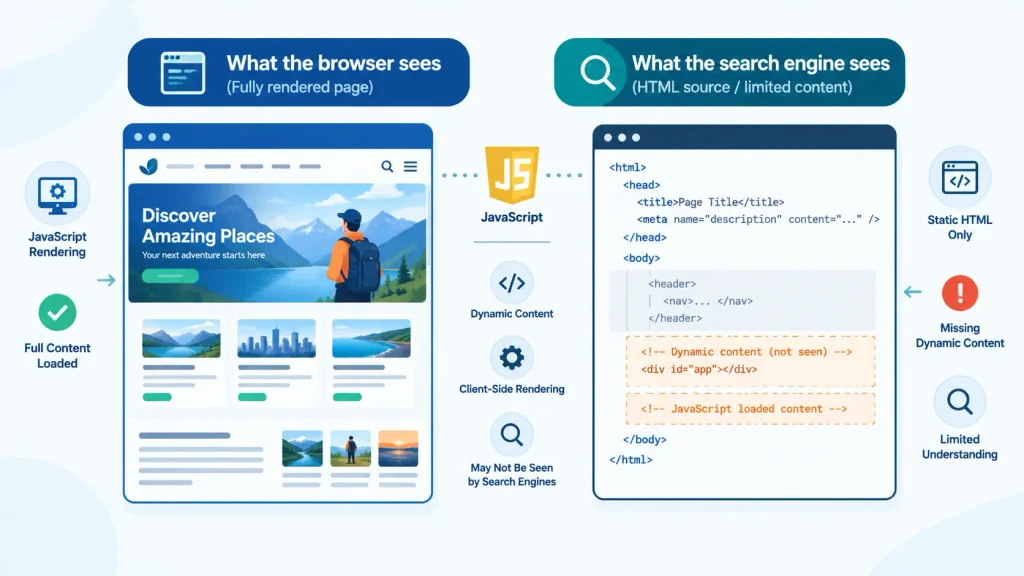
Modern websites rely heavily on JavaScript frameworks like React, Vue, and Angular. Google can render JavaScript, but rendering adds a step, and it is where many sites run into trouble.
How Google processes JavaScript
Googlebot crawls the URL, then queues the page for rendering using a recent version of Chromium, then indexes the rendered content. If critical content or links appear only after JavaScript runs, indexing can be delayed or incomplete, particularly if scripts fail, time out, or are blocked. Other search engines and AI crawlers may handle JavaScript less capably than Google does.
Rendering approaches
- Server-side rendering (SSR): The server sends fully formed HTML. It is the most reliable option for SEO and often improves perceived load speed.
- Static site generation (SSG): Pages are pre-built as HTML. It is excellent for content that does not change constantly.
- Client-side rendering (CSR): The browser builds the page from JavaScript. It works for Google in many cases, but carries the most risk for indexing and performance.
- Hybrid or incremental approaches: Frameworks like Next.js and Nuxt let you mix strategies by page type.
JavaScript SEO checklist
- Make sure titles, meta descriptions, canonical tags, and robots directives appear in the rendered HTML, and ideally in the initial HTML response.
- Use real links (<a href>) for navigation, not buttons or click handlers.
- Do not block JavaScript or CSS resources in robots.txt.
- Give each view a unique, crawlable URL. Avoid relying on URL fragments (#) for content.
- Return proper HTTP status codes. A JavaScript app that displays “page not found” but returns a 200 creates soft 404s.
- Lazy-load carefully. Content loaded only on scroll or interaction may never be seen by crawlers. Use native lazy loading for images, and make sure critical content loads without user action.
- Test with the URL Inspection tool in Search Console, which shows the rendered HTML and any blocked resources.
Structured Data Fundamentals: Speaking the Search Engine’s Language
Structured data is code that labels the content on your page so search engines can understand what it represents: a product, an article, a recipe, an event, a local business, an FAQ, and so on. It uses the shared vocabulary from Schema.org.
Why structured data matters
Structured data does not directly boost rankings, but it makes your pages eligible for rich results such as review stars, product pricing and availability, event details, breadcrumbs, and more. These enhanced listings can improve visibility and click-through rate. It also helps search engines connect entities, such as your organization, authors, and products, across the web.
Format and implementation
Google recommends JSON-LD, a script block placed in the page that keeps markup separate from visible HTML. A simple Organization example:
<script type=”application/ld+json”>
{
“@context”: “https://schema.org”,
“@type”: “Organization”,
“name”: “Example Company”,
“url”: “https://www.example.com”,
“logo”: “https://www.example.com/logo.png”
}
</script>
Commonly used schema types
- Organization / LocalBusiness: brand and location details
- Article / BlogPosting: publishing information
- Product and Offer: price, availability, ratings
- BreadcrumbList: site hierarchy in search results
- Event, Recipe, JobPosting, VideoObject: specialized content types
Structured data rules to follow
- Mark up only what is visible on the page. Hidden or misleading markup violates guidelines and can lead to manual actions.
- Include all required properties for the rich result you want.
- Validate using Google’s Rich Results Test and the Schema Markup Validator.
- Monitor the Enhancements reports in Search Console for errors and warnings.
- Keep it accurate and current. Outdated prices or availability in markup can erode trust.
Note that Google has reduced or retired some rich result types over time, such as FAQ and HowTo displays for most sites. Check current documentation before investing in a particular type. A reliable SEO service stays current on these changes rather than applying a fixed template to every client.
Diagnosing Common Technical SEO Errors
Knowing the theory is useful, but finding problems quickly is what separates experienced practitioners. Here is the diagnostic workflow I use.
Step 1: Start with Google Search Console
- Pages (Indexing) report: Shows which URLs are indexed and why others are not. Pay attention to statuses like “Crawled – currently not indexed,” “Discovered – currently not indexed,” “Duplicate without user-selected canonical,” and “Page with redirect.”
- Crawl Stats report: Reveals crawl volume, response times, and host-level availability issues.
- URL Inspection tool: Confirms how Google sees a specific page, including the rendered version and the chosen canonical.
- Core Web Vitals and Page Experience reports: Highlight slow or unstable pages.
Step 2: Run a full site crawl
Tools like Screaming Frog, Sitebulb, or Semrush’s Site Audit can crawl your site the way a search engine would. Look for:
- 4xx and 5xx status codes
- Redirect chains and loops
- Missing, duplicate, or overly long titles and meta descriptions
- Non-indexable pages in your sitemap
- Orphan pages
- Missing canonical tags or canonicals pointing at non-200 pages
- Pages blocked by robots.txt or carrying noindex tags unintentionally
Step 3: Match symptoms to causes
| Symptom | Likely cause | First thing to check |
| Important page not indexed | Noindex tag, robots block, or thin content | URL Inspection + page source |
| Wrong URL showing in results | Conflicting canonical signals | Canonicals, internal links, sitemap |
| Sudden traffic drop after launch | Robots.txt change, bad redirects, noindex left on | Robots.txt and redirect map |
| Slow indexing of new content | Weak internal links or crawl issues | Internal links, sitemap, server logs |
| Rich results disappeared | Markup errors or content mismatch | Rich Results Test, Enhancements report |
| Mobile rankings lag desktop | Mobile content or performance gaps | Mobile rendering, Core Web Vitals |
Step 4: Check Core Web Vitals
Page experience is part of technical health. Focus on Largest Contentful Paint (LCP) for loading, Interaction to Next Paint (INP) for responsiveness, and Cumulative Layout Shift (CLS) for visual stability. Common fixes include compressing and properly sizing images, serving modern formats like WebP or AVIF, deferring non-critical JavaScript, reserving space for ads and embeds, and using a CDN.
Step 5: Prioritize by impact
Not every warning in an audit tool deserves attention. I sort issues by three questions: Does it affect indexing of important pages? Does it affect many URLs? Is it easy to fix? A single noindex tag on a key category page outweighs a hundred missing alt attributes. This prioritization is the real value of a professional technical SEO service: turning a 500-line audit export into a short, ordered action plan.
Your Technical SEO Checklist at a Glance
Use this summary to review your own site:
- Only one HTTPS version of the site is accessible, with no mixed content
- Certificates are valid and renewals are automated
- XML sitemap contains only indexable, canonical, 200-status URLs
- Robots.txt does not block critical pages or resources
- Every indexable page has a correct self-referencing canonical
- No redirect chains, loops, or internal links to redirected URLs
- Broken internal links are fixed and valuable 404s are redirected
- Duplicate and near-duplicate pages are consolidated or differentiated
- Important pages are within a few clicks of the homepage
- Key content and links are visible in rendered HTML
- Structured data is valid and matches visible content
- Core Web Vitals pass on mobile
- Search Console is monitored on a regular schedule
How to Choose the Right SEO Service for Technical Work
If you decide to bring in outside help, be selective. After a decade in this field, these are the signals I look for in a trustworthy SEO service:
- They audit before they promise. A provider who guarantees rankings without examining your site is a red flag.
- They explain issues in business terms. You should understand why a fix matters, not just see a list of errors.
- They prioritize. A good provider delivers a roadmap with impact and effort ratings.
- They work with your developers. Technical SEO is implemented in code, so clear tickets and QA matter.
- They monitor after launch. Technical health changes with every release, plugin update, and content push.
- They report honestly. Transparent reporting tied to indexing, traffic, and conversions beats vanity metrics.
A strong technical SEO service should also include migration planning, log file analysis, and ongoing monitoring, not just a one-off report. Whether you hire an agency, a freelancer, or build the skills in-house, treat technical SEO as maintenance rather than a project with an end date.
Final Thoughts
Technical SEO is not glamorous, but it is the foundation everything else stands on. HTTPS protects your users, sitemaps and robots.txt guide crawlers, canonical tags and redirects consolidate your signals, and clean architecture makes good use of your crawl budget. Sound JavaScript handling and accurate structured data help search engines understand what they find, and a disciplined diagnostic process keeps small problems from becoming traffic losses.
Start with the checklist above, fix issues in order of impact, and recheck regularly. If the scope feels overwhelming, a reliable SEO service can shorten the path, but even doing it yourself, a few well-chosen fixes can unlock growth that no amount of new content would deliver. Technical excellence will not rank a bad page, but it makes sure your best pages get a fair chance.